 Roam
Roam
Day pass
24 hours
€4.99
Your iPhone, anywhere.
Change location on iPhone
Roam moves your iPhone's location for every app at once. Search a place, tap Teleport, and Maps, Find My and your other apps see you there.
Needs iOS 27 or newer
Without jailbreak and without a computer: you set it up on your iPhone in a few minutes.

Works withApple MapsFind MyMessagesevery app that uses your location
- Secure paymentiDEAL, Apple Pay or card, handled by Stripe.
- Money back if it doesn't workCan't get Roam running within 7 days? You get your money back.
- Help from a personStuck or a question? Chat with us on this site.
- Registered Dutch businessKvK 76347737
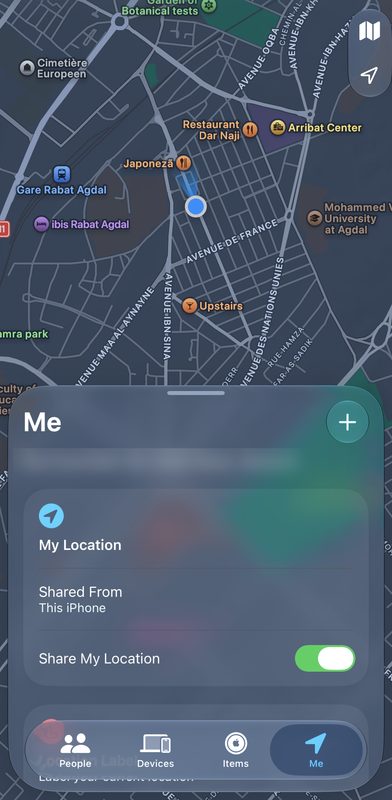
How to change location on iPhone
Roam is an iPhone app that changes the GPS location your iPhone reports to every app at once, including Apple Maps and Find My. It uses the location simulation Apple built into iOS for developers, runs on iPhones with iOS 27 or newer, needs no jailbreak or computer, and costs from €4.99 for a day.
What people use it for
- Test apps in another placeSee how an app, shop or service behaves in another city or country, without travelling.
- Keep your real location to yourselfChoose which location apps, and the people you share it with, get to see.
- Plan a tripWalk the route from your hotel to the station before you go.
What it looks like
One map, one big button. Everything else is a tap away.

Drop a pin
Search, tap the map or pick a saved place. Every pin gets a real name.
Teleport
One tap and your iPhone is there. The label at the top shows it's live.

Go there for real
Follow real roads at walking, running, cycling or driving pace.

Steer by hand
Move freely with the joystick. Up is always up on your screen.

Find any place
Addresses and places all over the world, as you type.

Keep your spots
Save favourites and jump back to places you've been.

Set up in minutes
A guided setup in English, Dutch, French or German.
Built to stay where you put it
Go anywhere
- TeleportAny address or place, in one tap.
- Real routesWalk, run, cycle or drive along real roads.
- JoystickSteer around by hand, at the pace you pick.
- Find My and sharingPeople you share your location with see the place you chose.
Stays on
- Heals itselfIf the connection drops, Roam reconnects within seconds.
- Comes backClosed Roam by accident? Open it and your location returns.
- Works on mobile dataWi‑Fi or 5G, it doesn't matter.
- VPN built inNo extra apps to install or keep running.
No fuss
- No computerYou pair Roam right on your iPhone.
- Favourites and recentsYour spots, one tap away.
- RemindersRoam tells you before your pass ends.
- PrivateNo tracking. Your places stay on your iPhone.
How you get it
Choose a pass
A day, a week, a month or a year. Questions first? Chat with us.
Check your iPhone and pay
Safari reads your iPhone's code and iOS version, then you pay via Stripe.
Install from your own link
You get a personal link by e-mail. Install Roam, turn on Developer Mode and follow the setup.
Passes
One pass is for one iPhone with iOS 27 or newer. When it ends your location goes back to normal, and Roam reminds you beforehand.
Needs iOS 27 or newer
Week pass
7 days
€9.99
€1.43 per day
Month pass
30 days
€14.99
€0.50 per day
Best value
Year pass
365 days
€49.99
€0.14 per day
Pay safely with iDEAL, Apple Pay or card. Money back if Roam doesn't work on your iPhone.
Who's behind Roam
Roam is built and supported in the Netherlands by BLOCC, a registered business. When you message us, you talk to the person who made it.
Questions
Which iPhones work?
Every iPhone with iOS 27 or newer. You can see your version in Settings › General › About › iOS Version. Our checkout checks it for you before you pay.
How do I change location on iPhone?
Search for a place, drop a pin or pick a saved place, then tap Teleport. You can also follow real roads or steer with the joystick. Your iPhone reports that location to every app.
Is Roam an iPhone GPS spoofer or a fake location app?
Roam is an iPhone location changer. It changes the GPS location your iPhone reports, which is what people mean by spoofing an iPhone location, a fake GPS or a fake location. It uses the location simulation Apple built into iOS for developers, so the location is simulated. Games that check, including Pokémon GO, notice it and some block accounts.
Does location sharing and Find My show the Roam location?
Yes. Find My and other location sharing that use your iPhone's location show the place Roam set. So do other apps that use the iOS location. You choose that place, so you can keep your real location private. Be fair to people who rely on knowing where you are.
Does it work with Pokémon GO and other games?
No. Games that check whether a location is simulated notice it, and some block accounts for it. Roam is for apps that use the location iOS gives them, like Maps.
Can I change my iPhone location without jailbreak and without a computer?
Yes. Without jailbreak and without a computer, you pair Roam on your iPhone and turn on Developer Mode once, a setting Apple builds into every iPhone.
How fast do I get access?
You get your personal install link by e-mail, usually within a few hours and always within 24 hours.
Can I get my money back?
Yes. If Roam doesn't work on your iPhone within 7 days of buying, message us and you get your money back.
Does it work without Wi‑Fi?
Yes, on mobile data too.
What happens when my pass ends?
Your iPhone goes back to its real location. Roam reminds you three days, one day and one hour before.
What if Roam closes?
iOS ends the location when Roam is closed. Open Roam again and it puts your location back. After restarting your iPhone, open Roam once.
Is this allowed?
Changing your own iPhone's location is fine for testing, privacy or fun. Some apps forbid it in their rules, so use Roam in line with the apps you use.